Runway video prompt generator workflow for fashion motion
This Runway video prompt generator example is motion-first: RefPrompt reads the fashion reference as a frame, then turns it into image language, video pacing, Midjourney shorthand, and Runway-ready camera direction.
RefPrompt adapts the reference for Runway by describing the frame as a motion scene: subject behavior, camera path, fabric movement, background continuity, and the emotional tempo of the shot.
Use this Runway video prompt generator page when you need a reference image, extracted art direction, a still-image prompt, a video prompt, a Midjourney version, a Runway version, and a focused negative prompt in one copy-ready workflow.
Runway image to video promptRunway Gen video promptimage-to-video promptingcamera worktemporal progressionfashion video promptAI video prompt from imagemotion prompt generator
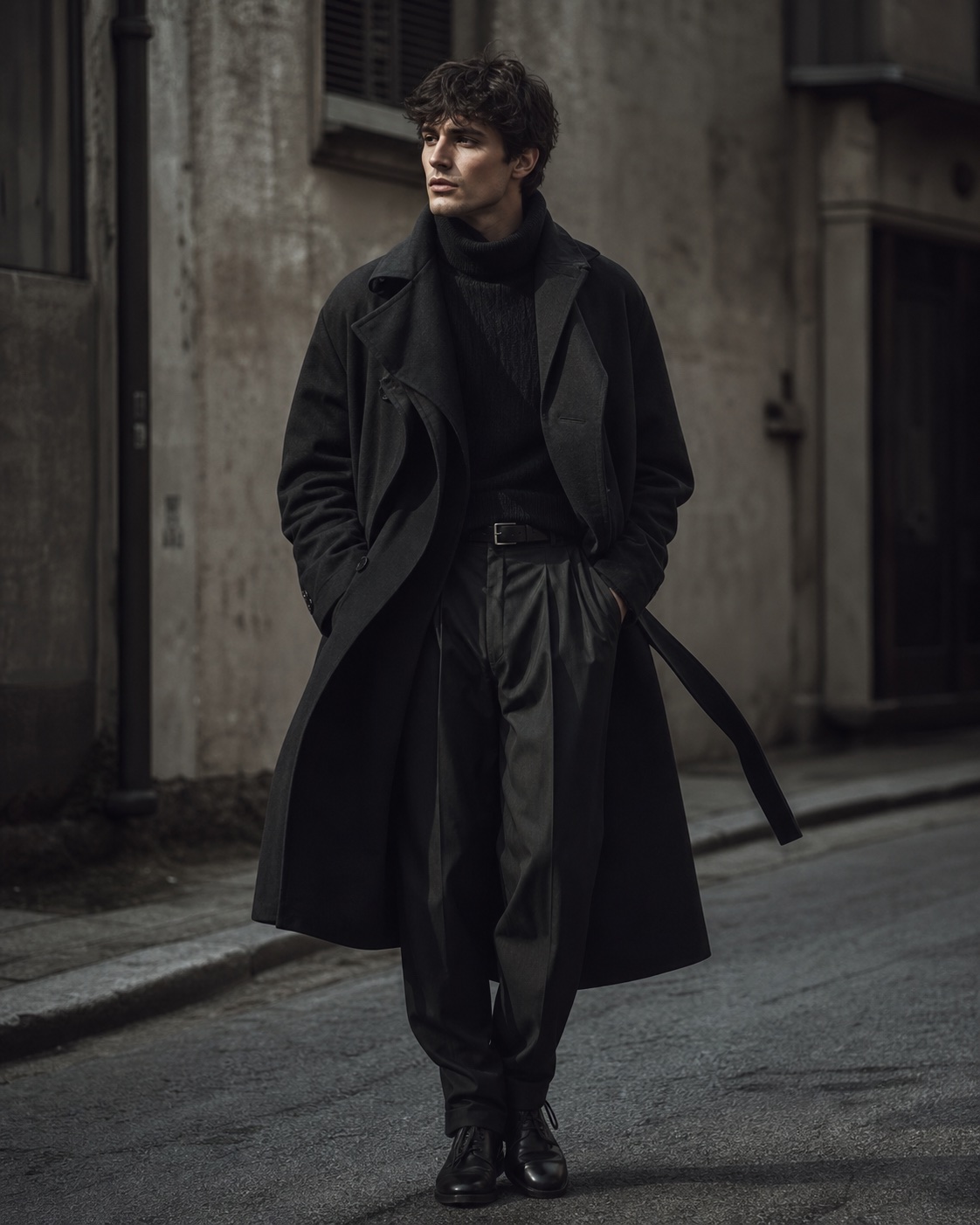
Reference direction: fashion-film posture, dark styling, street texture, and a slow editorial camera move.
Use your own reference
Turn your own visual into a structured prompt.
Use this Runway video prompt generator workflow with an image in the free web tool, or use the Chrome extension on an image or video already open in your browser.
The style breakdown keeps the fashion reference actionable, separating styling details from what Runway must animate over time.
Subject styling
Dark layered clothing, strong silhouette, relaxed editorial posture, and minimal accessory distraction.
Environment
Urban texture and muted background give contrast without stealing attention from the model and garment movement.
Camera tempo
The reference suggests a slow push or lateral drift, letting the styling read like a fashion film rather than a quick ad cut.
Continuity
The model, clothing folds, and background need to remain consistent from frame to frame as the camera moves.
Image Prompt
Image Prompt for Runway video prompt generator planning
The still-image prompt establishes fashion styling, mood, and composition before motion is added.
Editorial fashion portrait in an urban setting, dark layered styling, strong silhouette, calm confident posture, muted street texture, soft directional light, shallow depth of field, premium fashion-film mood, restrained color palette, cinematic composition, detailed fabric folds.
Video Prompt
Video Prompt
The general motion prompt turns the frame into a slow fashion-film sequence.
Slow fashion-film shot of a model in dark layered styling standing in a muted urban street. Camera makes a gentle lateral drift while the subject shifts weight slightly and fabric moves naturally. Keep the posture calm, lighting soft, background stable, and mood editorial. No fast cuts, no exaggerated posing, no shaky handheld movement.
Midjourney Version
Midjourney Version
Midjourney gets an image-first fashion prompt with concise visual controls.
editorial fashion portrait, dark layered styling, strong silhouette, muted urban street, soft directional light, shallow depth of field, cinematic fashion film mood, detailed fabric folds, restrained palette --ar 4:5 --style raw --v 6
Runway Version
Runway Version
Runway receives the motion-safe version with camera drift, subject micro-movement, and background stability.
Use the reference as a fashion-film keyframe. Create a 6-second shot with a slow lateral camera drift from left to right. The model remains calm, shifting weight subtly once while fabric moves naturally in a light breeze. Preserve clothing shape, face structure, background position, and soft directional light. Keep the pace editorial and continuous, with no cuts, no zoom pulse, no identity drift, and no changing outfit details.
Result & Limits
Runway video prompt generator result for fashion motion
The fashion reference has a stable subject, strong dark silhouette, textured street background, and enough fabric detail to make small motion visible. The Runway prompt should turn that still frame into a slow editorial drift without changing identity or outfit construction.
Generated result: dark layered fashion styling in an urban street frame, prepared for a slow lateral Runway camera drift.
Prompt used in this case
The Runway version below uses the reference as a six-second keyframe: slow lateral camera drift, one subtle weight shift, natural fabric movement, stable face and clothing, fixed background position, soft directional light, and no cuts or zoom pulse.
Result read
The generated result captures the dark layered styling, calm posture, and urban fashion-film mood. The still frame is strong, but video generation needs strict constraints for face stability, hands, coat edges, and background continuity.
What worked
The outfit silhouette and muted street texture are clear enough to guide a fashion-film clip.
A subtle camera drift is more believable than a fast reveal for this reference.
Fabric folds give Runway something to animate without requiring dramatic posing.
Errors and limitations
Identity drift
Faces can morph during a clip. A Runway prompt should explicitly preserve face structure and avoid changing outfit details.
Hands and fabric
Hands inside pockets and coat edges can smear or flicker. Keep the subject movement minimal and the camera path simple.
Background continuity
Urban textures can slide or change between frames, so the prompt should ask for fixed background position and no cuts.
Negative Prompt
Negative Prompt
Runway fashion prompts need protection against identity drift, fabric artifacts, and overactive camera moves.
face morphing, changing outfit, extra fingers, warped limbs, flickering fabric, unstable background, fast camera move, jump cut, zoom pulse, plastic skin, smeared facial detail, floating accessories, overexposed highlights, low-resolution street texture, unnatural pose, duplicated subject.
CTA
Reference in, structured prompts out.
Use the same page structure inside RefPrompt: start from a visual reference, then copy the prompt version that fits the tool and channel.
Frequently asked questions about Runway video prompt generator
What should a Runway video prompt generator include?
A Runway video prompt should include the reference look, subject behavior, camera path, shot length, pacing, environmental motion, and continuity rules. This page uses those details to turn a fashion reference into an editorial motion prompt.
Why is the Runway version more detailed than the image prompt?
The image prompt only needs to describe a still frame. The Runway version must also control time: lateral camera drift, subtle subject movement, fabric behavior, identity stability, and background consistency.
Can I use this workflow for fashion campaign videos?
Yes. The workflow is built for fashion-film references where clothing, silhouette, posture, and camera tempo need to stay consistent across a short AI video generation.