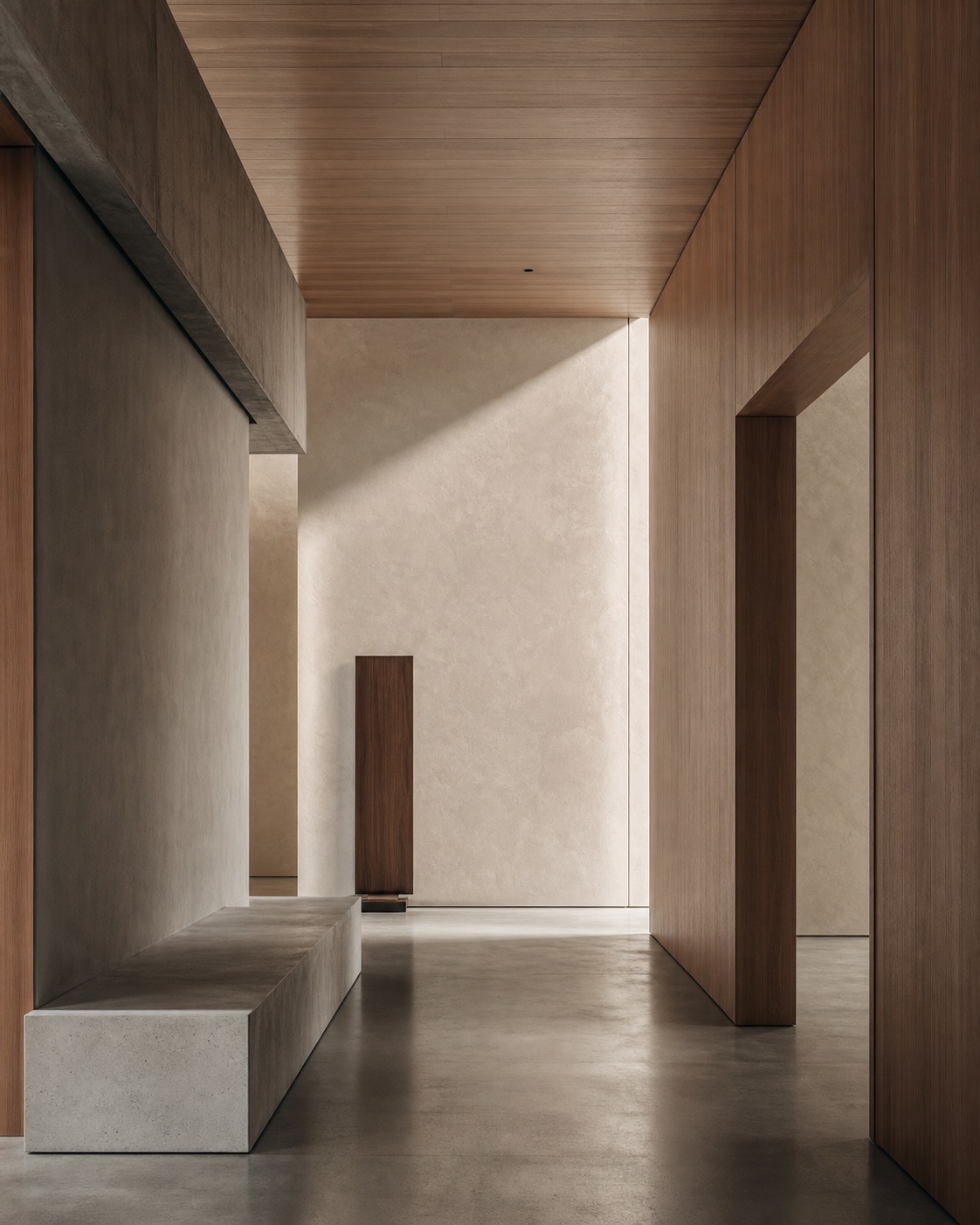
Image-to-prompt generator workflow for Midjourney prompts from images
This image-to-prompt generator example is built around a Midjourney prompt from image workflow: RefPrompt extracts the reference's architecture, lighting, material mood, and composition, then reshapes it into Midjourney-friendly language plus reusable video and negative prompts.
RefPrompt treats the image as a visual grammar source, then compresses that grammar into the concise nouns, materials, lighting cues, and aspect-ratio controls Midjourney responds to best.
Use this Midjourney prompt from image page when you need a reference image, extracted art direction, a still-image prompt, a video prompt, a Midjourney version, a Runway version, and a focused negative prompt in one copy-ready workflow.
image to prompt generatorMidjourney image promptprompt from imagereverse image promptAI image analyzervisual reference promptstyle breakdown promptMidjourney prompt generator
Use this Midjourney prompt from image workflow with an image in the free web tool, or use the Chrome extension on an image or video already open in your browser.
The video version keeps the same environment but adds a slow reveal and continuity.
Slow interior reveal through a minimal architectural space, camera gliding from a shadowed foreground plane into a softly lit room. Maintain matte concrete and wood textures, side-lit shadows, quiet gallery atmosphere, and stable geometry. Motion should feel like an architectural film: smooth, slow, and observational, with no sudden cuts or decorative effects.
Midjourney Version
Midjourney Version
This is the shortest and most visual form of the reference, tuned for Midjourney scanning.
Runway receives the same reference with camera movement, reveal timing, and stable spatial constraints.
Use the image as a reference for a slow 5-second architectural reveal. Begin close to a dark foreground plane, then glide right to reveal the warm wood and softly lit concrete space. Keep the room geometry consistent, preserve matte textures, maintain natural side light, and avoid adding people, furniture clutter, lens warping, or dramatic lighting changes.
Result & Limits
Midjourney prompt from image result for a minimal interior
The image-to-prompt generator should not describe every object in the room. The useful extraction is the visual grammar: large planes, matte concrete, warm wood, diffuse side light, restrained palette, clean negative space, and quiet architectural stillness.
Generated result: a restrained architectural interior with concrete, warm wood, soft plaster, and clean negative space.
Prompt used in this case
The Midjourney version below compresses the longer image-to-prompt analysis into compact visual language: minimal architectural interior, sculptural concrete planes, warm wood, soft plaster, side light, quiet gallery atmosphere, restrained neutrals, and --style raw.
Result read
The generated result keeps the reference's calm architecture, material contrast, and side-lit planes. It is useful as a Midjourney exploration frame, but the prompt still needs negative constraints for perspective, clutter, and fake glossy materials.
What worked
The short Midjourney prompt preserved material contrast without overexplaining the scene.
Side light and strong planes survived better than small decorative details.
The result demonstrates why image-to-prompt extraction should focus on reusable visual decisions, not literal object lists.
Errors and limitations
Perspective control
Architectural prompts expose crooked walls quickly. Add perspective and geometry negatives when the output must feel real.
Material drift
Concrete, plaster, and wood can become glossy or synthetic unless the prompt names matte, tactile surfaces.
Reference compression
Midjourney often works better with concise cues, but over-compressing can lose the reference's spatial rhythm.
Negative Prompt
Negative Prompt
For Midjourney and video tools, the main risks are clutter, fake materials, and unstable geometry.
Frequently asked questions about Midjourney prompt from image
How do I create a Midjourney prompt from image references?
Start by extracting the reference's subject, materials, lighting, composition, mood, and camera language. Then compress those details into Midjourney-friendly phrasing with aspect ratio and style controls, as shown in the Midjourney Version section.
Why is the Midjourney prompt shorter than the full image prompt?
Midjourney responds well to compact visual cues. The longer image prompt is useful for general tools, while the Midjourney version removes extra explanation and keeps the strongest nouns, materials, light, and composition signals.
Can this Midjourney prompt from image workflow be reused for video tools?
Yes. The same reference can become a Runway or Kling prompt by adding camera movement, pacing, scene continuity, and negative constraints that protect geometry and material consistency.